

Ticket Categories Overview
The Ticket Categories feature in SafariDesk allows you to organize and classify support tickets into specific subtopics within a department. If Departments represent broad support areas, then Categories act as the next level of detail giving both customers and agents a clearer picture of what each ticket is about. For example:- Department: IT / Technology
- Categories: Bug Report, Technical Support
- Department: Sales
- Categories: Billing / Payment, Feature Request
Why Ticket Categories Matter
Categories improve your support workflow by:- Making ticket classification more precise
- Helping agents quickly understand the nature of an issue
- Improving reporting and analytics across departments
- Enabling better ticket routing within specific teams
- Enhancing the customer experience during ticket submission
Accessing Ticket Categories
Navigate to: Configuration → Ticket Categories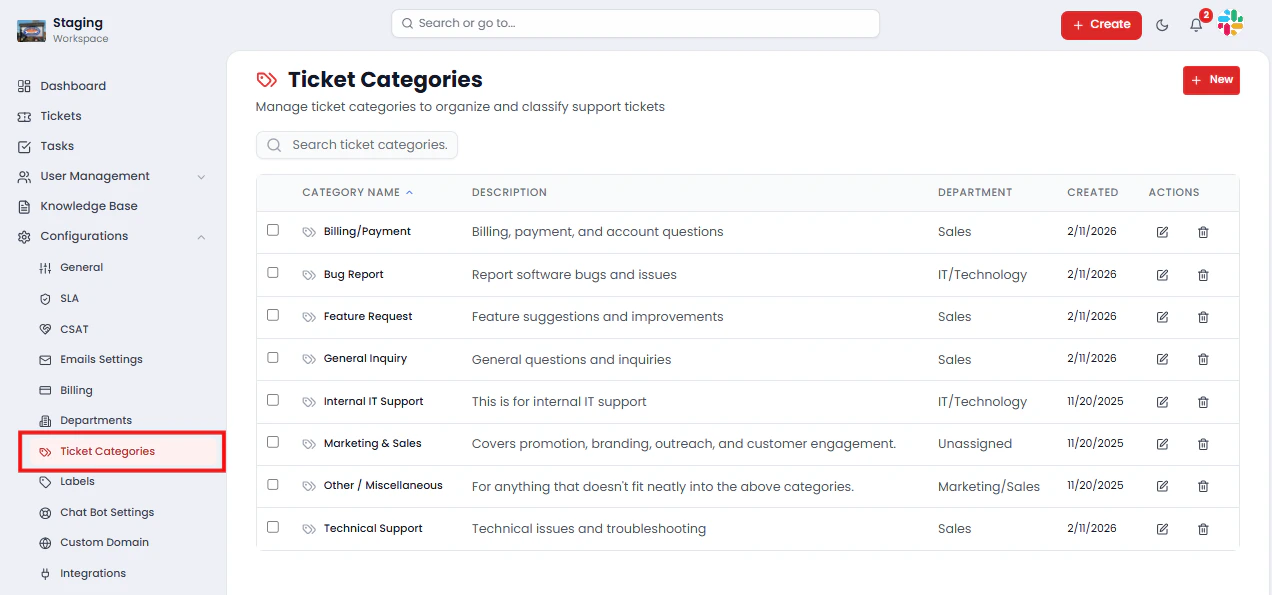
- Category Name
- Description
- Department (Assigned or Unassigned)
- Created Date
- Actions (Edit, Delete)
Creating a Ticket Category
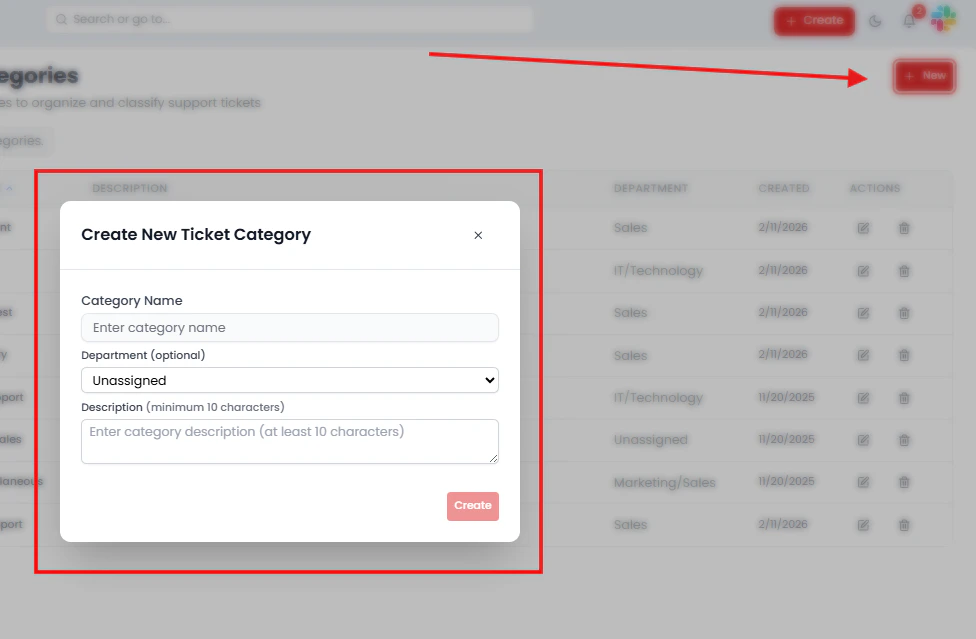
To create a new category:- Click the New button
- Fill in the required fields:
- Category Name — A clear and descriptive label for the category
- Department (optional) — Assign the category to a specific department
- Description — A brief explanation of the category (minimum 10 characters)
- Click Create
💡 If no department is selected, the category will remain Unassigned and will not appear in department-specific ticket flows. Always assign categories to a department for consistent routing.
Editing a Ticket Category
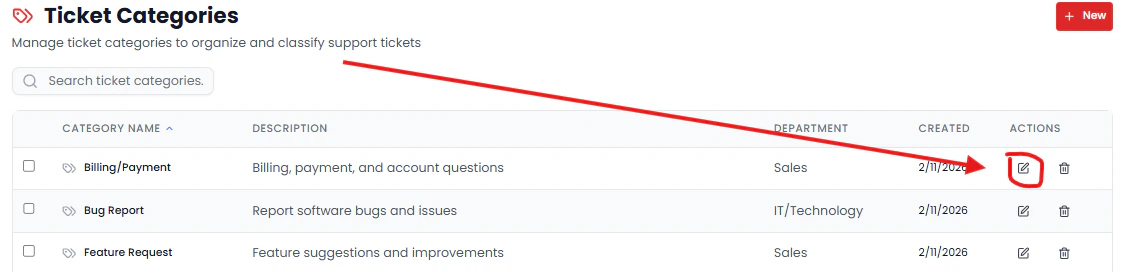
To update an existing category:- Click Edit from the Actions column
- Modify the name, description, or department assignment as needed
- Click Save
Deleting a Ticket Category
To remove a category that is no longer needed:- Click Delete from the Actions column
- Confirm the deletion
⚠️ Deleting a category may affect how existing tickets are classified and reported. Review any active tickets associated with the category before proceeding.
How Categories Work with Departments
Categories are closely tied to departments and drive the ticket classification flow your customers experience. Key behaviors to be aware of:- When a customer selects a department, only that department’s associated categories are displayed
- Unassigned categories will not appear in structured department ticket flows
- Categories refine ticket classification within a department for more accurate routing and reporting
- A customer creates a ticket
- They select Department: IT / Technology
- Available categories appear — e.g., Bug Report, Technical Support
- The ticket is submitted with both a department and a category attached
Best Practices
To get the most value from Ticket Categories:- Use clear, descriptive names — agents and customers should instantly understand what a category means
- Always assign categories to a department — unassigned categories are easy to overlook and disrupt ticket flows
- Avoid overlapping categories — too many similar options create confusion during ticket submission
- Keep descriptions concise but informative — a single sentence is usually enough
- Audit categories regularly — remove or consolidate unused categories to keep the list clean and relevant
Saving Changes
After creating or editing a category, click Save or Create to apply your changes.⚠️ Unsaved changes will not be applied.
Summary
Ticket Categories in SafariDesk provide the second layer of structure in your support system — working alongside Departments to ensure every ticket is precisely classified from the moment it is submitted. By combining Departments (broad areas) with Categories (specific subtopics), your team can:- Route tickets accurately without manual reassignment
- Give agents immediate context on the nature of each issue
- Improve reporting granularity across teams and topics
- Deliver a more structured, professional experience for customers submitting requests
Need Help?
If you have any questions or need assistance, contact our support team at[email protected]** **We’re always here to help you get the most out of SafariDesk.