

CSAT Management Overview
The CSAT (Customer Satisfaction) module in SafariDesk enables you to automatically collect customer feedback after every resolved support interaction. By sending surveys when a ticket is closed, your team gains actionable insight into performance, uncovers service gaps, and builds a clearer picture of how customers perceive your support experience. This module is essential for teams that want to maintain high service standards and continuously improve based on real customer input.Accessing CSAT Settings
Navigate to: Configuration → CSAT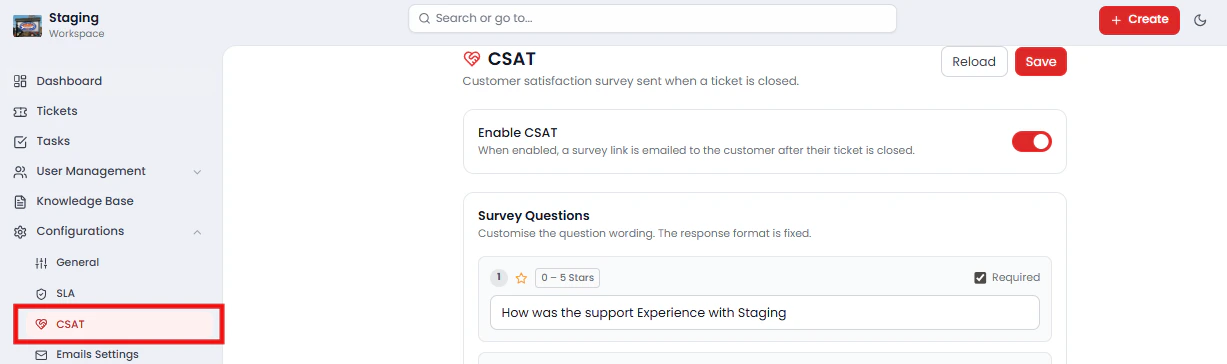
Enabling CSAT Surveys
To begin collecting customer feedback:- Navigate to Configuration → CSAT
- Toggle Enable CSAT to ON
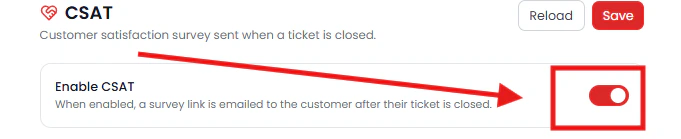
💡 Once enabled, SafariDesk will automatically send a survey link to the customer’s email address each time a ticket is closed. Feedback is collected while the experience is still fresh, improving response quality and accuracy.
Survey Questions
SafariDesk provides a set of default survey questions with fixed response formats to ensure consistency across all feedback and reporting. You can customize the wording of each question to match your brand voice or support focus.⚡ Response formats are fixed for reporting consistency, but question text is fully editable. Adjust wording to reflect your brand tone or highlight specific areas of your support process.
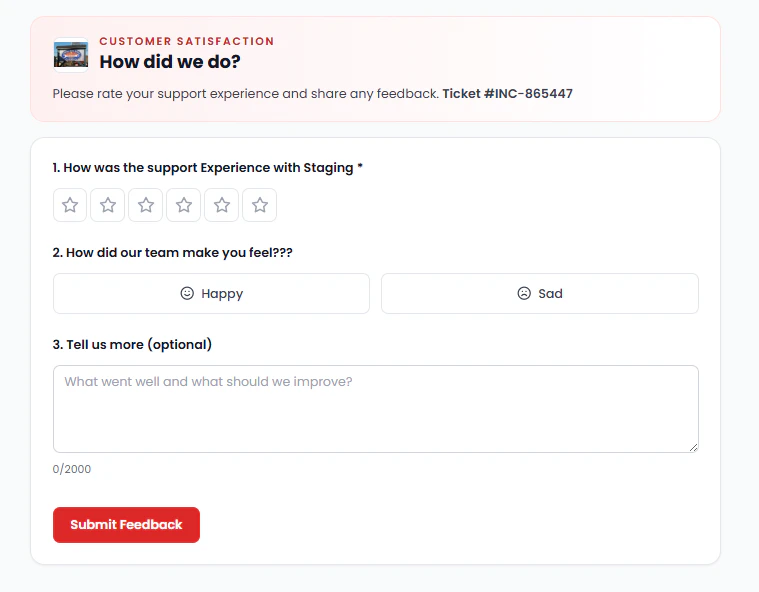
Survey Content Configuration
Beyond individual questions, SafariDesk allows you to customize the overall presentation of your survey to make it engaging and on-brand.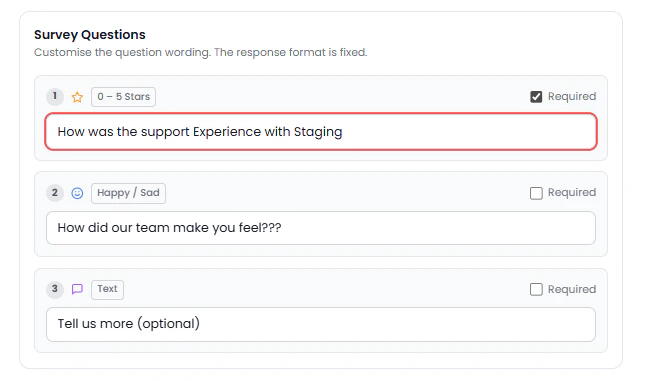
- Survey Title – The headline displayed at the top of the survey
Example: “How did we do?” - Intro Text – A short message shown before the survey questions
Example: “Please rate your support experience and share any feedback.” - Thank-you Title – Shown after the customer submits their response
Example: “Thank you for your feedback” - Thank-you Message – A closing note displayed on the confirmation screen
Example: “We appreciate your time and value your feedback.” - Survey Link Expiry – The number of hours the survey link remains active
Default: 336 hours (14 days)
💡 Best Practice: Set the survey link expiry long enough to give customers a reasonable window to respond, but short enough that the feedback remains relevant to their experience. The default 14-day window works well for most teams.
How CSAT Works
Once enabled, the CSAT process runs automatically with no additional action required from your agents:- An agent closes a ticket in SafariDesk
- SafariDesk automatically sends a survey link to the customer’s email address
- The customer completes the survey using the configured questions and formats
- Responses are recorded and aggregated within SafariDesk for review and reporting
📊 CSAT scores feed directly into your reporting dashboard, allowing you to track team performance, identify trends over time, and measure the impact of process improvements.
Best Practices
To get the most value from your CSAT data:- Keep surveys concise – Shorter surveys drive higher response rates. Stick to the core questions and avoid overloading customers
- Use clear, direct language – Make sure question wording is easy to understand at a glance
- Review responses regularly – Check CSAT results consistently to spot patterns before they become larger issues
- Follow up on negative feedback – Reach out to dissatisfied customers when appropriate to resolve lingering concerns and rebuild trust
- Recognize top performers – Use CSAT scores to highlight agents who consistently deliver excellent support
Saving Changes
After configuring your survey questions, content, or expiry settings, click Save Changes to apply your configuration.⚠️ Unsaved changes will not be applied.
Summary
The CSAT module in SafariDesk gives your team a structured, automated way to collect and act on customer feedback after every ticket resolution. With it, you can:- Measure customer sentiment in real time after each interaction
- Customize survey questions and content to align with your brand
- Track response trends to identify service gaps and performance highlights
- Hold teams accountable through transparent satisfaction reporting
[email protected] We’re always here to help you get the most out of SafariDesk.