

Overview
The Roles and Permissions Management feature in SafariDesk allows you to control user access, assign responsibilities, and manage your support team efficiently. By defining roles such as Admin and Agent, you can ensure that each user has the appropriate level of access to perform their tasks while maintaining system security and accountability. This feature is essential for teams that need structured access control and visibility into user activity.Accessing Roles and Permissions
To manage users and their roles, navigate to: User Management → Roles & Permissions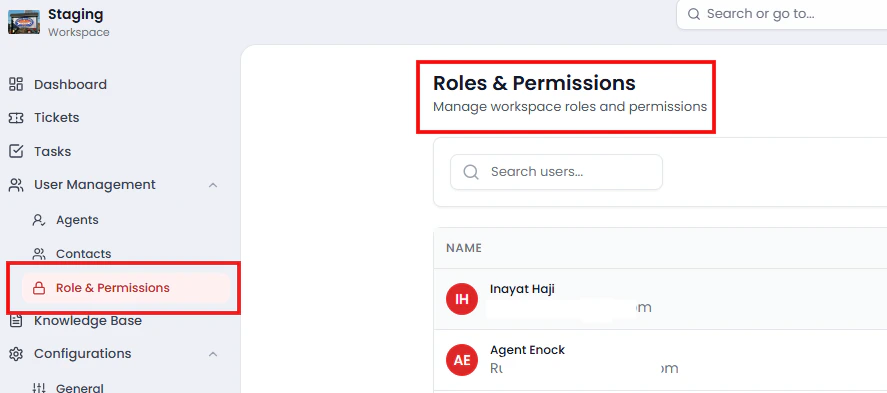
User Directory Overview
The Roles & Permissions page displays a list of all users with the following details:- Name – User’s full name
- Email – Registered email address
- Role – Assigned role (Admin or Agent)
- Status – Indicates whether the user is active
- Last Login – Most recent login timestamp
- Created – Date the user was added
- Actions – Options to manage the user
Inviting Users
To add a new user to your workspace, click the Invite User button. Enter the user’s email address and assign a role. Once invited, the user will receive access to the system based on their assigned permissions.Understanding Roles
SafariDesk currently supports two primary roles:Admin
Admins have full access to the system and can:- Invite and remove users
- Assign and modify roles
- Manage workspace settings
- Oversee system activity and usage
Agent
Agents are operational users who handle day-to-day support tasks.- Access tickets and customer interactions
- Perform assigned workflows
- Limited administrative control
Managing User Roles
You can update a user’s role at any time using the Actions menu.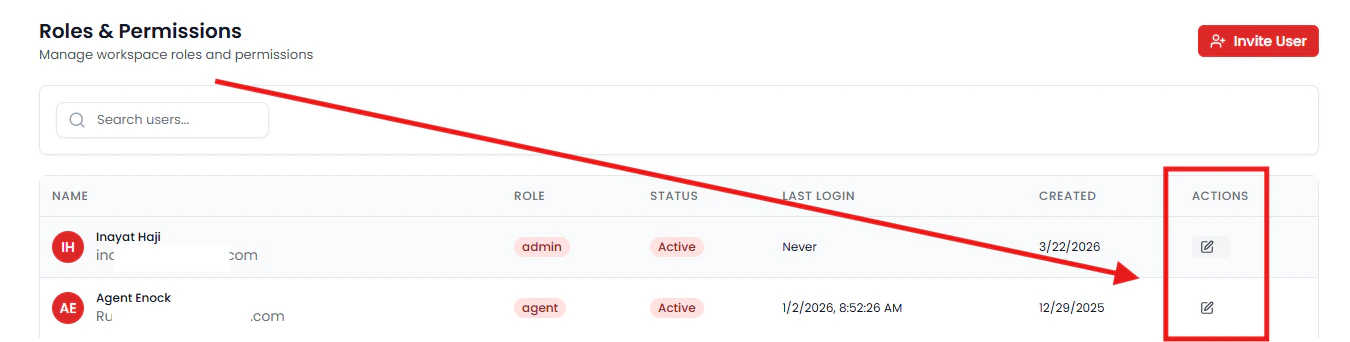
- Edit Role
Change a user’s role from Agent to Admin or vice versa - Update Status
Activate or deactivate a user’s access - Remove User (if enabled)
Permanently remove a user from the workspace
Tracking User Activity
The Last Login field provides visibility into user activity.- Users who have never accessed the system will display “Never”
- Active users show their most recent login timestamp
Best Practices for Role Management
To maintain a secure and efficient workspace:- Assign Admin roles sparingly to avoid unnecessary access
- Regularly review user activity and permissions
- Deactivate or remove inactive users
- Use Agents for operational tasks and limit administrative privileges
Need Help?
If you have any questions or need assistance, contact our support team at[email protected]**. **We’re always here to help you get the most out of SafariDesk.